Convert one JPG, JPEG, or JFIF image to PNG
Re-encode one JPG, JPEG, or JFIF as PNG at the same pixel dimensions. The output avoids another lossy save, but it cannot reverse JPEG artifacts or invent transparency.
Create a PNG in your browser
Select one JPG-family image up to 50 MiB and download its PNG representation.
Open JPG to PNGJPG-to-PNG workflow
These screenshots show the actual Converttwo interface for this workflow.
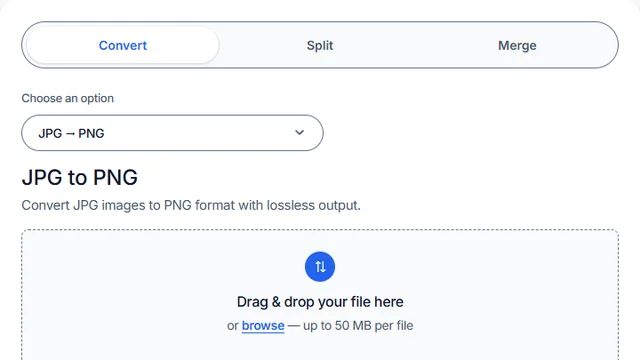
Open JPG to PNG
Open JPG to PNG in the converter.
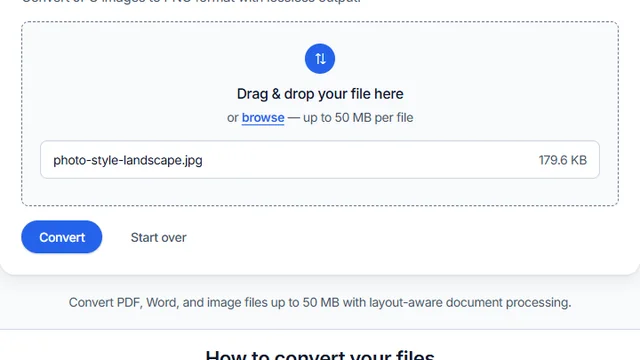
Select one JPG-family image
Select one JPG, JPEG, or JFIF file and confirm it is no larger than 50 MiB.
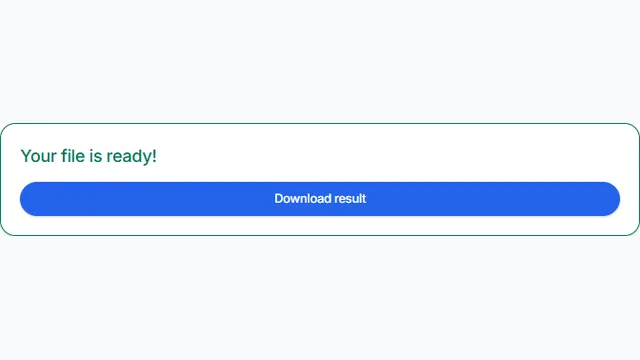
Convert, download, and compare
Convert, download the PNG, and compare it with the source at 100% zoom.
Implementation details you can verify
The converter accepts one file identified as JPG, JPEG, or JFIF. The per-file limit is 50 MiB. After decoding, neither dimension may exceed 16,384 pixels and total width multiplied by height may not exceed 40,000,000 pixels. These decoded limits matter even when the compressed JPG is small.
The browser draws the decoded source onto a canvas with the same width and height and encodes that canvas as PNG. Source metadata is not explicitly copied. The tested example below documents one conversion and does not generalize its file-size result.
Tested September 14, 2026 in Chrome
The tested PNG kept the JPG's opaque white corner
Using the live repository converter code, we selected samples/sample-png-to-jpg.jpg, converted and downloaded it, then compared exact byte sizes, decoded dimensions, and corner RGBA values.


Inspect the expanded JPG-to-PNG measurements for photo and small-text sources, including decoded-pixel and file-size results.
What changes in the output
The output is a PNG at the source's decoded pixel dimensions. Existing JPEG artifacts remain, and the tool does not remove the background or create transparency. For the distinction between lossless encoding and repairing source quality, read the image format guide.
Suitable and unsuitable cases
Use this conversion when software requires PNG, when a stable lossless representation of the currently decoded pixels is useful, or before adding graphics in an editor that should avoid another lossy export. It can also suit screenshots that arrived as JPG, while preserving their existing artifacts.
It is unsuitable as a JPEG repair, quality enhancer, background remover, transparency generator, image resizer, or reliable file-size reducer. PNGs made from photographs are often larger than their JPG sources. Keep the original camera or master file if future editing or archival provenance matters.
Metadata, color, and privacy caveats
Source metadata is not explicitly copied, so EXIF orientation, camera data, location, dates, copyright fields, embedded thumbnails, and color-profile data should not be assumed to survive. Confirm orientation, color, and any required metadata in the downloaded PNG.
Decoding and PNG creation happen in the browser; the selected image is not posted to the document-conversion API. The page still loads third-party page assets, including hosted resources, so it is not equivalent to an offline application. Review the Privacy Policy before processing sensitive images.
Troubleshooting
The PNG is larger than the JPG
This is expected for many photographs. PNG preserves the decoded pixels losslessly, while JPG uses lossy compression optimized for continuous-tone imagery.
The PNG still has JPEG blocks
The blocks were already present in the decoded source. Re-encoding stops an additional lossy JPEG save but does not reconstruct discarded information.
A modest file is rejected as too large
Check dimensions, not only bytes. Reduce the image below 16,384 pixels on each side and no more than 40,000,000 total decoded pixels.
Need a quality or file-size comparison?
The photo and screenshot test checks decoded pixels and output size. Use those measurements to understand this conversion, rather than expecting restored detail or a smaller file.
Convert the decoded image to PNG
Keep the source, then check output size, color, orientation, and existing JPEG artifacts.
Convert JPG to PNG